Artificial intelligence is now built into almost every stage of graphic design, from early concepts and image generation to vector production, product photography, interface design, and final delivery. The problem is no longer finding an AI tool. It is choosing the right one without paying for five platforms that overlap.
This guide compares 15 of the best AI tools for graphic designers in 2026. Instead of treating every platform as an interchangeable image generator, we focus on where each tool fits in a real design workflow, what it does best, where it falls short, and whether you can start for free.
Pricing and feature availability were checked on August 31, 2026. Plans, credits, and regional prices can change, so always confirm the latest details on the official product page before subscribing.
Best AI Tools for Graphic Designers at a Glance
Best overall for Adobe users: Adobe Firefly
Best for visual exploration and art direction: Midjourney
Best for conversational image creation and editing: ChatGPT Images
Best for fast reference-based photo edits: Gemini with Nano Banana 2
Best for typography inside generated images: Ideogram
Best for editable vectors and SVG assets: Recraft
Best for controlled image production: Leonardo.Ai
Best all-in-one creative AI platform: Magnific, formerly Freepik
Best for social media and marketing layouts: Canva AI
Best for typography, merchandise, and mockups: Kittl
Best for UI and product design: Figma AI
Best for e-commerce product photos: Photoroom
Best for AI video and motion content: Runway
Best for image enhancement and upscaling: Topaz Photo
Best free AI color palette tool: Khroma
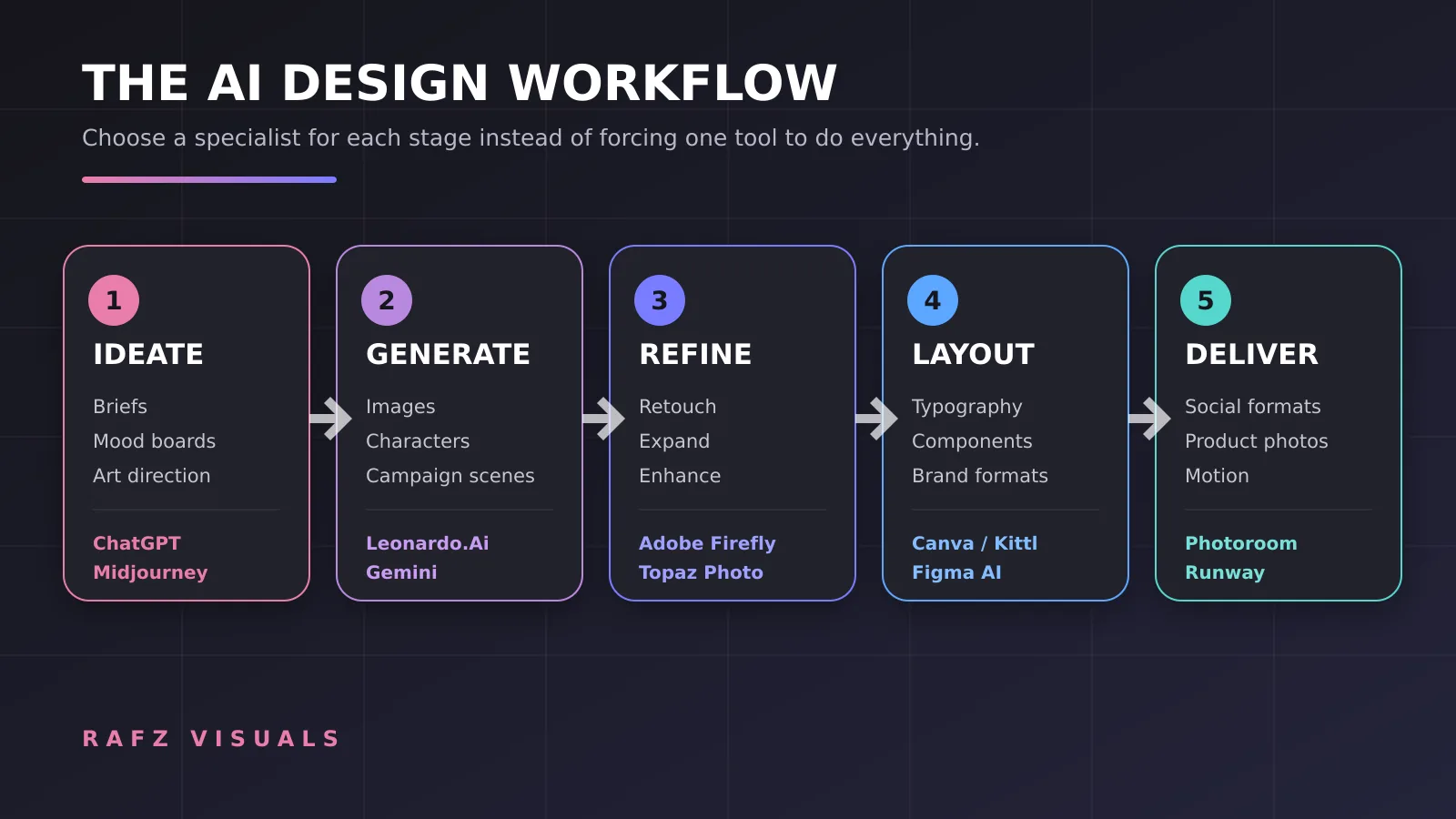
How We Chose These AI Design Tools
We evaluated these platforms by their usefulness inside a professional design process, not by how many AI features they advertise. The main criteria were:
Quality and consistency of the output
Creative control and prompt adherence
Ability to edit rather than regenerate everything
Typography, vector, and export capabilities
Fit with established design software
Speed for repetitive production work
Free access, paid value, and credit limitations
Suitability for commercial and client work
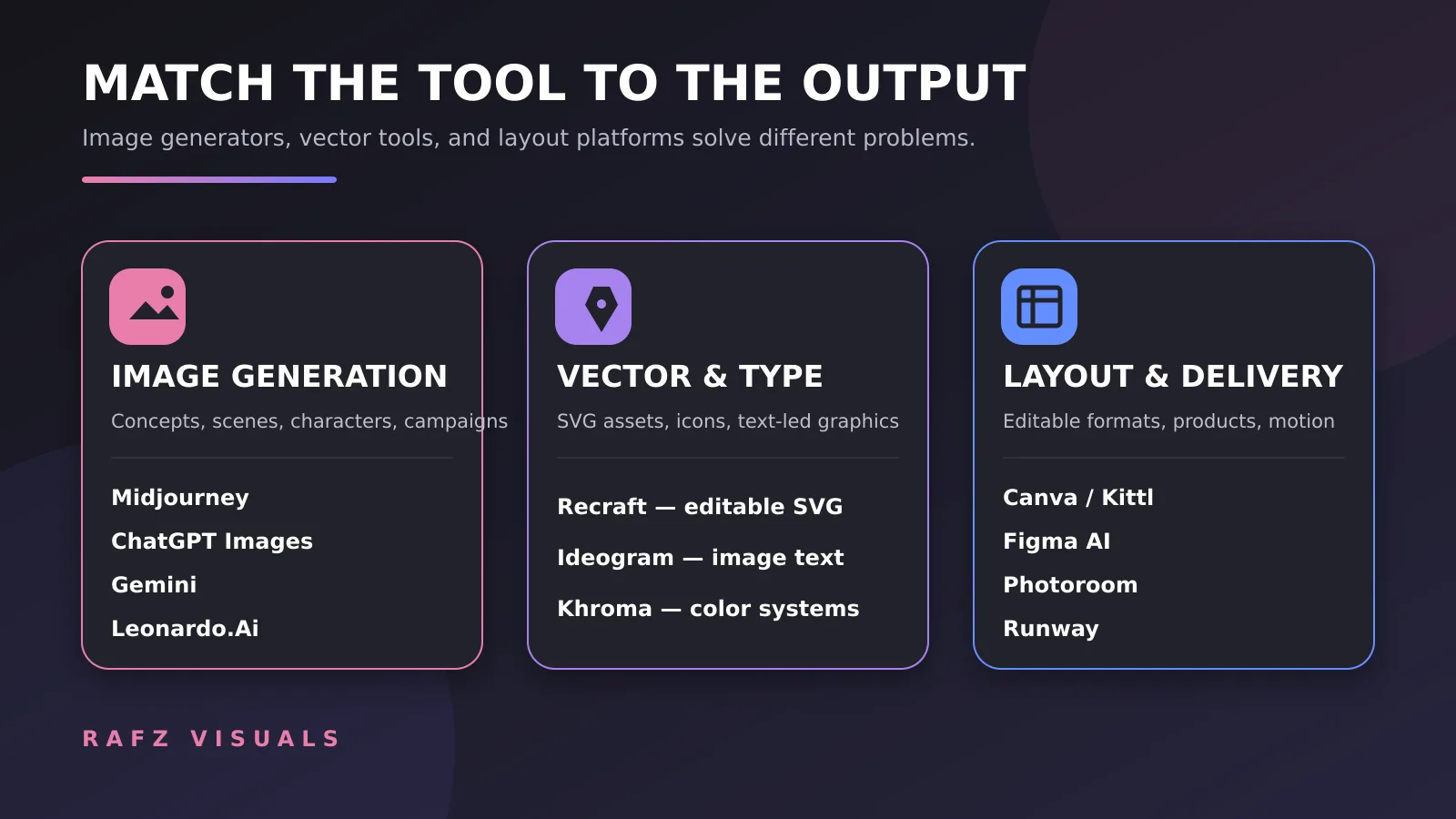
No single platform wins every category. A tool that creates beautiful campaign concepts may be weak at editable vectors. A fast social media editor may not offer the control required for a complex brand system. The most effective approach is usually a small AI design stack in which every tool has a clear role.
1. Adobe Firefly — Best for Professional Adobe Workflows
Adobe Firefly is the strongest general choice for designers who already work in Photoshop, Illustrator, Adobe Express, or the wider Creative Cloud ecosystem. Its biggest advantage is not simply image generation. Firefly places generative tools inside software that professional designers already use for editing and delivery.
Firefly can generate and edit images, vectors, video, and audio. In Photoshop, designers can use Generative Fill and Generative Expand to replace objects, rebuild backgrounds, or create extra room for a headline. Illustrator users can generate vector graphics and recolor artwork while keeping the result inside an editable production workflow.
Adobe also provides access to selected partner models within Firefly and Photoshop. This gives designers more visual choices without forcing them to move every asset between separate platforms.
Why designers may choose Firefly
Deep integration with Photoshop and Illustrator
Generative Fill, Expand, Remove, and reference-based editing
Image, vector, video, and audio generation in one environment
Useful for layered files and revision-heavy client work
Commercially oriented Adobe workflow and Content Credentials support
Main limitation
Firefly delivers its highest value when you already use Adobe products. Designers outside Creative Cloud may find standalone generators more visually distinctive or less expensive.
Pricing
A limited free plan is available. Paid Firefly plans add more generative credits and premium features, with the entry paid tier listed at approximately $9.99 per month in the United States at the time of writing.
Best for: professional graphic designers, agencies, Photoshop users, and commercial production.
2. Midjourney — Best for Art Direction and Visual Exploration
Midjourney remains one of the strongest platforms for expressive visual concepts, editorial imagery, cinematic scenes, mood boards, and campaign exploration. It is especially useful when a designer needs to discover the visual direction before building the final layout.
The current Midjourney web experience includes image editing, layers, selections, inpainting, outpainting, style references, personalization profiles, and mood boards. These controls make it more practical than the earlier prompt-and-variation workflow.
Midjourney is still primarily a visual generator rather than a complete graphic design application. You will normally move the selected image into Photoshop, Illustrator, Figma, Canva, or another layout tool for typography and final production.
Why designers may choose Midjourney
Strong aesthetic quality and visual variety
Excellent for concept art, campaign directions, and mood boards
Personalization and style-reference controls
Web-based editor with layers and local edits
Fast exploration of lighting, composition, materials, and atmosphere
Main limitation
The results are generally raster images, and precise brand layouts or editable vectors still need another application. Midjourney also does not currently provide a general free trial on its website or Discord.
Pricing
Paid plans start at $10 per month, with higher tiers adding more GPU time, privacy options, and relaxed generation modes.
Best for: art directors, illustrators, campaign designers, and anyone developing a visual direction.
3. ChatGPT Images — Best for Conversational Creation and Precise Iteration
ChatGPT Images is useful when the design process needs more than a single prompt. A designer can discuss the brief, upload references, generate a starting image, request a targeted edit, compare alternatives, and continue refining the same idea through conversation.
The current image system has improved text rendering, multilingual output, instruction following, and detail preservation during edits. This makes it practical for poster concepts, social media visuals, product scenes, storyboards, mockups, and reference-based transformations.
Its strongest advantage is context. The same workspace can help develop the creative direction, improve the prompt, write the headline, generate the image, and prepare supporting copy.
Why designers may choose ChatGPT Images
Natural conversational workflow
Strong prompt understanding and multi-step refinement
Ability to work with multiple reference images
Useful text rendering for headlines and labels
Combines ideation, writing, research, and image creation
Main limitation
AI-generated compositions are not a substitute for a layered PSD, clean Illustrator paths, or a complete design system. Professional outputs may still need manual typography and final retouching.
Pricing
ChatGPT has a free plan with usage limits. Paid access provides higher limits and additional capabilities; ChatGPT Plus is listed at $20 per month in the United States.
Best for: iterative visual creation, reference-based edits, creative briefs, and designers who want one conversational workspace.
4. Gemini with Nano Banana 2 — Best for Fast Reference-Based Editing
Gemini's Nano Banana 2 combines fast image generation with conversational editing. It is particularly effective when a designer wants to upload an existing image and change the background, replace an object, adapt a style, combine references, or preserve a subject across several edits.
Google has focused on subject consistency, instruction following, multilingual text rendering, and fast iteration. This makes Gemini useful for mockups, localized graphics, product concepts, outfit changes, and social media experiments built from existing photos.
Why designers may choose Gemini
Fast generation and editing
Strong multi-image composition
Useful subject and character consistency
Conversational local edits
Improved text rendering and localization
Main limitation
Generated text, fine details, logos, and factual graphics should still be verified manually. Usage limits and access to the newest models depend on the account and region.
Pricing
Limited image creation is available through free Gemini access. Google AI subscriptions provide higher limits and access to additional models and features.
Best for: rapid photo variations, reference blending, mockups, localization, and quick client concepting.
5. Ideogram — Best for Text Inside AI-Generated Images
Ideogram is built for a problem that many image generators still struggle with: readable typography inside an image. It is a strong choice for posters, signage, packaging concepts, book covers, thumbnails, and campaign visuals in which the words are part of the composition.
Ideogram 4.0 adds dense multilingual text rendering, object and text placement controls, high-resolution output, and more advanced editing workflows. Its canvas and editor can reframe, extend, remix, layer, and refine generated visuals.
Why designers may choose Ideogram
Strong text rendering inside generated images
Useful for posters, packaging, and title-led compositions
Prompt adherence and placement controls
Canvas-based editing and image extension
Free access for initial experimentation
Main limitation
Even strong AI typography is not automatically production-ready. Spelling, kerning, alignment, and brand-font accuracy must be checked before delivery.
Pricing
Ideogram offers free access and paid platform plans. API usage is also available with per-image pricing.
Best for: posters, thumbnails, packaging concepts, book covers, and headline-led campaign images.
6. Recraft — Best for Vectors, Icons, and SVG Assets
Recraft stands out because it can generate actual vector assets instead of only producing raster images that look like vectors. Designers can create SVG illustrations, icons, logos, stickers, and graphic elements, then refine paths and colors in Recraft's vector editor.
The platform also includes raster generation, mockups, image editing, upscaling, background removal, and custom styles. However, its clearest advantage is the ability to move from a prompt to scalable and editable artwork.
Why designers may choose Recraft
Text-to-vector and SVG generation
Editable paths and vector layers
Strong icon and illustration workflows
Custom styles for consistent asset families
Raster, vector, mockup, and editing tools in one workspace
Main limitation
Complex logos and precision-critical brand marks still require manual path correction. AI should be used to explore and accelerate vector production, not to skip professional refinement.
Pricing
A free plan is available. The Basic paid plan starts at $12 per month when billed monthly, with annual billing discounts. Commercial ownership terms differ between free and paid outputs, so check the current license before client use.
Best for: icon sets, scalable illustrations, SVG assets, stickers, and early logo exploration.
7. Leonardo.Ai — Best for Controlled Image Production
Leonardo.Ai is designed for creators who need more control than a simple prompt box. It supports multiple image models, reference-based generation, precise editing, custom models, consistent characters, motion tools, and upscaling.
Its workflow is useful when a project requires many related visuals rather than one attractive image. Designers can maintain a visual direction across campaign assets, characters, products, or concept variations and refine individual elements without starting again.
Why designers may choose Leonardo.Ai
Wide selection of models and style controls
Image and video generation
Reference-driven editing and consistency tools
Custom model training on paid plans
Upscaling and quality enhancement
Main limitation
The range of models, tokens, and settings can feel complicated at first. Credit consumption also varies by model and feature.
Pricing
The free plan currently includes a daily token allowance. Paid individual plans start at $12 per month before tax.
Best for: campaign asset production, consistent characters, concept art, product visuals, and controlled iteration.
8. Magnific, Formerly Freepik — Best All-in-One Creative AI Platform
Freepik is now Magnific. The platform has expanded beyond stock assets into a broad creative AI environment for image, video, audio, editing, upscaling, mockups, and automated workflows.
Magnific is valuable for designers who want access to several leading models without maintaining a separate subscription and workflow for every provider. Its Spaces canvas can combine generation, editing, and reusable workflows, while the existing stock library remains useful for daily production.
Why designers may choose Magnific
Multiple image and video models in one platform
Large stock library alongside AI tools
Image generation, editing, retouching, expansion, and upscaling
Mockups, product visuals, audio, and video tools
Collaborative and repeatable workflows through Spaces
Main limitation
The large toolset can make credit usage difficult to predict. Designers should compare how many generations their preferred models consume before selecting a plan.
Pricing
A limited free tier is available. Paid plans begin with Premium, listed at $20 per month or a lower monthly equivalent when billed annually at the time of writing.
Best for: freelancers and agencies that want stock assets, multiple AI models, and production tools under one subscription.
9. Canva AI — Best for Social Media and Marketing Design
Canva AI is one of the fastest ways to turn an idea into a finished social post, presentation, flyer, ad, or branded content set. Its strength is not only generation. Canva combines AI with templates, Brand Kits, collaboration, resizing, publishing, and a familiar visual editor.
Magic Design can generate editable layouts from a prompt or uploaded image. Other AI features help write copy, remove backgrounds, edit photos, resize formats, generate media, and convert ideas into multiple campaign assets.
Why designers may choose Canva AI
Fast editable layouts for social and marketing content
Brand Kit and reusable templates
One-click resizing and format adaptation
Collaboration and approval tools
Large content library and low learning curve
Main limitation
Canva prioritizes speed and accessibility over the granular control of Photoshop, Illustrator, or specialist production software. Template-heavy results may also look generic without a designer's intervention.
Pricing
Canva Free includes basic design access and limited AI usage. Canva Pro and Business provide more AI allowance, premium assets, Brand Kits, and advanced workflow features. Regional prices vary.
Best for: social media designers, SMM teams, marketers, small businesses, and high-volume branded content.
10. Kittl — Best for Typography, Merchandise, and Mockups
Kittl combines AI generation with strong typography tools, editable graphics, templates, mockups, and print-focused workflows. It is particularly useful for T-shirts, packaging, badges, posters, labels, merchandise, and product listings.
Unlike a standalone image generator, Kittl keeps the generated material inside a design workspace where text, vectors, layouts, and mockups can be adjusted. That makes it easier to move from an idea to a presentable product visual.
Why designers may choose Kittl
Strong typography and text effects
Merchandise and print-design templates
Integrated mockups and product presentation
AI generation inside an editable design canvas
Useful asset and font library
Main limitation
The free plan is mainly for personal exploration, and professional export or commercial licensing generally requires a paid plan. Advanced vector work may still need Illustrator or another dedicated editor.
Pricing
Kittl offers a free plan. At the time of writing, Pro is listed at $19 per month and Expert at $49 per month, with commercial licensing included on paid plans subject to Kittl's terms.
Best for: merch designers, print sellers, packaging concepts, logo presentations, and typography-heavy graphics.
11. Figma AI — Best for UI and Product Design
Figma AI brings AI directly into collaborative product design. Designers can generate new directions, create diagrams, edit images, search files, rewrite content, and refine interface concepts while remaining inside the same design system and team workflow.
Figma's advantage is editability and collaboration. Generated work can be reviewed, adjusted, connected to components, prototyped, and handed to developers. Figma Make extends this process toward interactive prototypes and implementation.
Why designers may choose Figma AI
AI inside an established UI/UX workflow
Editable design layers and components
Image generation, removal, expansion, and upscaling
Real-time collaboration and shared libraries
Strong connection between design, prototype, and development
Main limitation
Figma is not primarily a high-end image generator. Its AI is most valuable for product and interface workflows rather than cinematic artwork or finished advertising photography.
Pricing
The Starter plan includes a limited monthly AI credit allowance. Professional and organization plans provide more credits, with optional paid credit expansion for heavier usage.
Best for: UI/UX designers, product teams, web designers, design systems, and interactive prototypes.
12. Photoroom — Best for AI Product Photography
Photoroom is built for turning ordinary product photos into clean commercial visuals. It can remove backgrounds, generate studio or lifestyle scenes, add shadows, stage products, create fashion-model presentations, and process image batches consistently.
This is more useful for e-commerce work than a general image generator because Photoroom focuses on preserving the product while rebuilding its presentation. Agencies and sellers can maintain similar lighting, backgrounds, and brand treatment across a catalog.
Why designers may choose Photoroom
Fast background removal and replacement
AI product staging and lifestyle scenes
Brand Kits and reusable visual treatments
Batch processing for product catalogs
Web and mobile workflow
Main limitation
Photoroom is specialized. It is excellent for products, listings, and promotional shots but not a replacement for a general illustration, vector, or UI design platform.
Pricing
A free plan is available with limited exports and AI use. Paid Pro, Max, and Ultra plans increase credits, export volume, batch capabilities, and model access.
Best for: e-commerce designers, product sellers, marketplaces, catalog production, and small brands.
13. Runway — Best for AI Video and Motion Content
Runway helps designers extend static creative work into video, motion, and campaign content. It supports text-to-video, image-to-video, video editing, object removal, product transformations, audio tools, and access to multiple generation models.
For a graphic designer, Runway becomes valuable after the key visual is approved. A poster, product image, character, or campaign scene can be turned into a short animation for Reels, ads, presentations, or social media.
Why designers may choose Runway
Image-to-video and text-to-video generation
AI video editing and object removal
Multiple image, video, audio, and language models
Upscaling and production export options
Useful for ads, social content, storyboards, and motion concepts
Main limitation
Video generation consumes credits quickly, and results may require several iterations. Designers should treat short AI clips as part of a production workflow rather than assuming every generation will be final.
Pricing
The free plan includes a one-time credit allowance and watermarked video. Standard is listed at $15 per month or $12 per month when billed annually, with higher plans providing more credits and export options.
Best for: motion designers, campaign teams, social media creators, and designers turning still visuals into video.
14. Topaz Photo — Best for Upscaling and Image Enhancement
Topaz Photo focuses on improving existing images rather than generating an entire design. It can sharpen details, reduce noise, recover focus, improve faces, and upscale files for larger displays or print.
This makes it valuable near the end of the workflow. A designer may generate or receive an image that is visually strong but too small, noisy, or soft for professional delivery. Topaz can help prepare that asset before final retouching and export.
Why designers may choose Topaz Photo
AI sharpening and focus recovery
Noise reduction and face enhancement
High-resolution upscaling
Batch-friendly professional workflow
Useful as a finishing tool for generated and photographed assets
Main limitation
Topaz cannot repair every generation error. Over-processing may create artificial texture, so the enhanced image still requires visual inspection at full size.
Pricing
Topaz Photo is a paid product. The personal plan is listed at approximately $25 per month with a 12-month billing commitment at the time of writing. Trials and bundle pricing may vary.
Best for: print preparation, low-resolution source files, photographers, and designers finishing AI-generated assets.
15. Khroma — Best Free AI Color Palette Tool
Khroma is a focused AI color tool that learns from the colors you select and generates personalized combinations. Palettes can be viewed as gradients, typography pairs, image overlays, or color blocks.
Khroma also provides HEX and RGB values, CSS code, and WCAG accessibility ratings. It will not build a full brand identity for you, but it can speed up color exploration at the beginning of a project.
Why designers may choose Khroma
Personalized color suggestions
Unlimited palette exploration
Search by hue, tint, value, HEX, and RGB
Typography and gradient previews
Accessibility information for color pairs
Main limitation
Color suggestions still require design judgment. Brand meaning, print behavior, cultural context, and accessibility cannot be delegated entirely to an algorithm.
Pricing
Khroma is free to use in the browser.
Best for: brand exploration, mood boards, UI palettes, presentation colors, and designers who want a focused free tool.
Which AI Tool Is Best for Your Design Work?
The best choice depends on the deliverable, not on which platform has the longest feature list.
For social media design
Start with Canva AI for layouts, resizing, and Brand Kits. Use ChatGPT Images, Gemini, Midjourney, or Leonardo.Ai when the campaign needs custom source imagery rather than template-based visuals.
For Photoshop-based professional work
Adobe Firefly is the most natural choice because generation and editing remain inside Photoshop and Illustrator. Topaz Photo is a useful finishing tool when resolution and image quality matter.
For posters and typography
Ideogram is strong when the words must appear inside the generated composition. Kittl is better when you want to continue editing the typography, build a printable layout, or place the design on a mockup.
For vectors and icons
Recraft is the most focused option because it generates real SVG assets and includes vector editing. Always inspect paths and refine important brand marks manually.
For product visuals and e-commerce
Photoroom is the fastest specialist for background removal, catalog consistency, and lifestyle product scenes. Magnific and Kittl are useful when the workflow also includes mockups, stock assets, or campaign variations.
For UI/UX design
Figma AI is the strongest fit when the work must remain collaborative, editable, connected to components, and ready for prototyping or developer handoff.
For motion and video
Runway is the specialist choice for turning still visuals into short campaign videos. Magnific and Leonardo.Ai also offer useful motion options when you want image and video tools in the same platform.
Three Practical AI Design Stacks
You do not need subscriptions to all 15 tools. A smaller stack is cheaper, easier to learn, and usually produces better work.
Free or low-cost starter stack
ChatGPT or Gemini for ideas and image iteration
Canva Free for layouts and social formats
Recraft or Ideogram free access for vectors and typography experiments
Khroma for color palettes
Freelancer and social media stack
ChatGPT Images or Leonardo.Ai for custom visuals
Adobe Photoshop with Firefly for retouching
Canva Pro for resizing and recurring client formats
Runway when a still campaign needs a motion version
Professional agency stack
Adobe Creative Cloud and Firefly for production
Midjourney or Leonardo.Ai for visual exploration
Figma AI for interfaces and collaboration
Photoroom for product catalogs
Runway for motion deliverables
Topaz Photo for final enhancement
The exact combination should follow your recurring work. If 80 percent of your projects are social posts, a strong Canva workflow may save more time than an advanced image model. If you create premium campaign visuals, image quality and editing control matter more than template volume.
Can AI Replace Graphic Designers?
AI can replace individual tasks, but it does not replace the complete role of a good designer.
Generating a visually attractive image is only one part of design. Professional work also requires understanding the audience, interpreting the brief, building hierarchy, selecting typography, managing grids, checking accessibility, preparing files, handling revisions, and knowing what should not be generated in the first place.
AI is most effective when it removes repetitive work and expands exploration. The designer remains responsible for taste, strategy, consistency, accuracy, licensing decisions, and final quality.
Frequently Asked Questions
What is the best AI tool for graphic designers?
Adobe Firefly is the strongest overall option for designers already using Photoshop and Illustrator. Midjourney is excellent for visual exploration, Recraft for vectors, Canva AI for social layouts, and Figma AI for interface design. The best tool depends on the final deliverable.
What is the best free AI tool for graphic design?
Canva, ChatGPT, Gemini, Ideogram, Recraft, Leonardo.Ai, Photoroom, Runway, and Khroma all provide some form of free access, although generation limits and commercial rights differ. Khroma is completely focused on free color exploration, while the others use limited credits or restricted features.
Which AI tool is best for Photoshop users?
Adobe Firefly is the best fit because its generative features are integrated into Photoshop. Designers can use AI to expand images, remove objects, rebuild backgrounds, and create variations without leaving the main editing environment.
Which AI tool is best for creating logos?
Recraft is useful for generating editable vector concepts, while Kittl provides typography and presentation tools. However, AI-generated logos should be treated as starting points. A final logo still requires manual vector refinement, originality checks, and trademark research.
Can AI-generated designs be used commercially?
Commercial terms vary by platform, plan, model, and source material. Some free plans limit commercial use or make generations public. Always check the current license, avoid unauthorized logos and characters, and confirm that you have permission to use uploaded reference images.
Is Midjourney better than Adobe Firefly?
Midjourney is often stronger for expressive concepts and visual exploration. Firefly is better integrated into professional Adobe editing and revision workflows. Many designers use Midjourney for direction and Firefly or Photoshop for production.
How many AI design tools do I actually need?
Most designers need two to four tools with clearly separated roles: one for ideation or image generation, one for professional editing, one for layout or collaboration, and an optional specialist for video, vectors, or product photography.
Final Verdict
The best AI tools for graphic designers in 2026 do not eliminate the design process. They make specific parts of it faster.
Adobe Firefly is the most practical choice for established professional workflows. Midjourney remains excellent for visual direction. ChatGPT Images and Gemini make iterative editing more conversational. Recraft brings AI into real vector production, while Canva, Kittl, and Figma turn generated ideas into editable layouts. Photoroom, Runway, Topaz Photo, and Khroma solve focused production problems that general generators often overlook.
Choose tools based on the work you deliver every week, not on the loudest AI launch. A small, well-designed workflow will outperform a folder full of subscriptions you barely use.
Looking for ready-to-use creative resources and prompt collections? Explore the Rafz Visuals Store or discover the growing collection of tools at Rafz AI.

Comments (0)
No comments yet — be the first.