AI image generators are no longer just novelty tools. Designers now use them to explore campaign directions, build mood boards, create product-scene concepts, test compositions, generate supporting artwork, and speed up repetitive visual work. The difficult part is knowing which platforms are genuinely free and which ones only advertise a trial.
This guide compares 12 of the best free AI image generators for designers in 2026. Every tool included here had a working free entry point listed on its official website or support documentation when this article was checked on September 3, 2026. We also looked beyond image quality to examine real usage limits, privacy, commercial-use rules, editing features, and how each platform fits into a professional design workflow.
Free plans change frequently. Daily allowances may shrink during periods of high demand, some tools publish free generations to a public gallery, and a free output is not automatically licensed for client work. Always confirm the latest terms before using generated content commercially.
Best Free AI Image Generators at a Glance
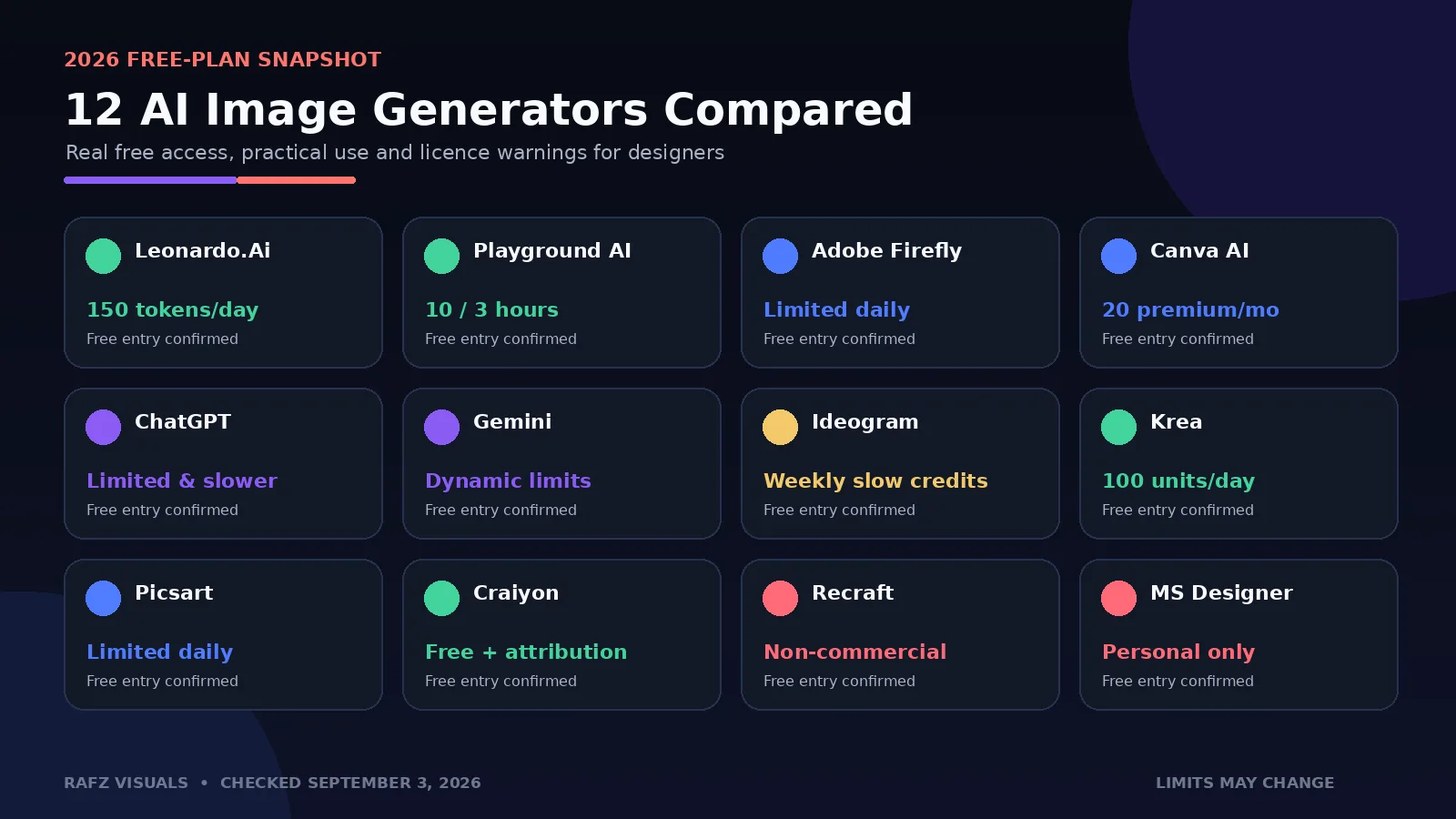
Tool | Best for | Current free access | Commercial-use note |
|---|---|---|---|
Leonardo.Ai | High-control image generation | 150 fast tokens daily | Commercial use allowed under a non-exclusive licence; free creations are public |
Playground AI | Frequent free design concepts | Up to 10 images every 3 hours | Worldwide royalty-free commercial licence listed |
Adobe Firefly | Adobe-centered workflows | Limited daily generations | Check the selected model and feature status |
Canva AI | Social graphics and layouts | Up to 200 Standard AI or 20 Premium AI uses monthly | Canva and third-party asset licences still apply |
ChatGPT Images | Conversational creation and editing | Limited, slower image generation | Review output before professional use |
Google Gemini | Fast prompt-based generation and revisions | Standard free limits for Nano Banana 2 | Limits are dynamic and may change with demand |
Ideogram | Typography and poster concepts | Weekly slow credits for eligible free accounts | Free access depends on account type and eligibility |
Krea | Real-time exploration and multi-model testing | 100 compute units daily | Verify the current licence before client delivery |
Picsart | Generate-and-edit social content | Limited free generations daily | Rights depend on the model and plan |
Craiyon | Unlimited-style casual ideation | Free text-to-image generation | Commercial use allowed with attribution on free accounts |
Recraft | Vector and illustration experiments | Free public generations | Free-plan outputs are not licensed for commercial use |
Microsoft Designer | Personal social and design concepts | Free with a Microsoft account | Licensed for personal, non-commercial use |
How We Evaluated These Free AI Image Generators
We did not rank tools only by how impressive a single demo image looked. A useful design platform must remain practical after the first prompt. We evaluated each option using the following criteria:
Whether a real free plan or ongoing free allowance currently exists
The number of generations, credits, or compute units available
Prompt accuracy and overall image quality
Control over style, composition, aspect ratio, and reference images
Editing and iteration tools after the first generation
Privacy and whether free creations are published publicly
Commercial-use permissions for free outputs
Suitability for mood boards, social posts, product concepts, posters, illustrations, and client work
The ranking balances quality with practical value. A generator can produce beautiful images and still rank lower if its free plan is too restrictive, unclear, or unsuitable for commercial projects.
1. Leonardo.Ai — Best Overall Free AI Image Generator for Designers
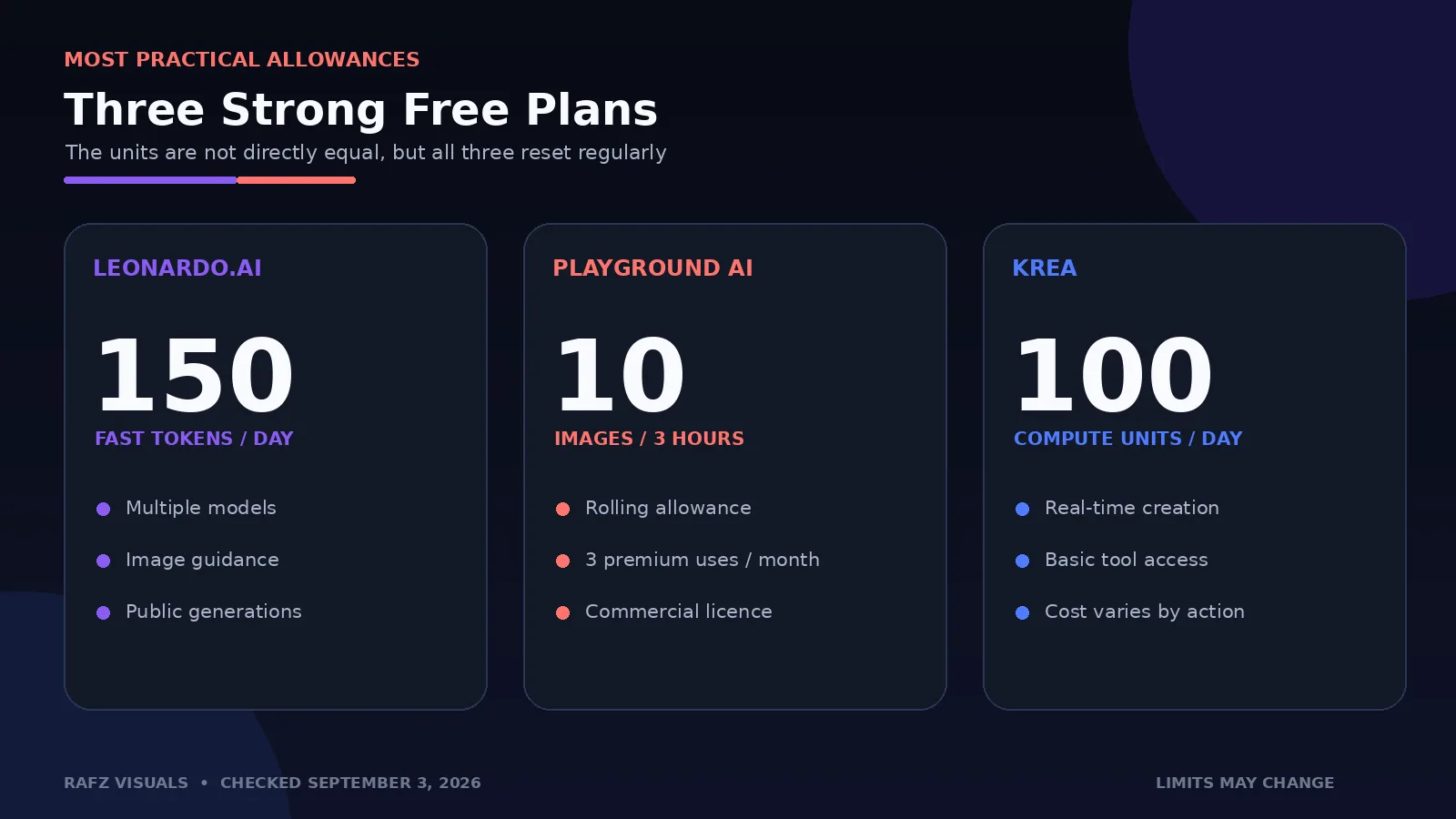
Leonardo.Ai offers one of the most useful ongoing free plans for designers who want more control than a basic text box. Its official pricing page currently lists 150 fast tokens per day for free users. The exact number of images depends on the model, dimensions, quality settings, and extra features selected, so 150 tokens should not be read as 150 images.
Leonardo provides multiple first-party and third-party models, presets, image guidance, real-time creation tools, and post-processing features. This makes it suitable for concept art, editorial imagery, advertising directions, product-scene exploration, character ideas, and visual assets that will later be refined in Photoshop or another design application.
Why designers may choose Leonardo.Ai
150 fast tokens reset daily
Broad selection of models and visual presets
Image guidance and reference-based generation
Useful controls for composition, style, and output quality
Free access to image generation and selected editing features
Commercial use is allowed under a non-exclusive, royalty-free licence
Important limitation
Free-plan generations are public. Leonardo retains broad rights to free creations, and other users may be able to access publicly available assets through platform features. Do not upload confidential client material or unreleased campaign concepts to the free tier.
Best for: designers who want a capable general-purpose generator with a daily allowance.
2. Playground AI — Best Free Plan for Frequent Concept Generation
Playground AI has one of the clearest free offers in this comparison. Its current pricing page lists up to 10 base-model images every three hours, plus three monthly generations shared across selected premium models such as Nano Banana, GPT Image, and Seedream.
Unlike many free platforms, Playground explicitly lists a worldwide royalty-free commercial licence for its free plan. That makes it attractive for designers who need a larger volume of rough concepts, social graphics, poster directions, or presentation visuals without immediately paying for a subscription.
Why designers may choose Playground AI
Up to 10 free images every three hours
A small monthly allowance for premium models
Templates and design-oriented workflows
Useful for posters, thumbnails, invitations, and social graphics
Commercial use included on the official free-plan comparison
Important limitation
Free generations can be slower during busy periods, and premium-model access is extremely limited. The base model is most useful for exploration; high-stakes final artwork still requires careful checking and refinement.
Best for: high-volume ideation, social designs, and designers who need commercially usable free concepts.
3. Adobe Firefly — Best for Adobe Creative Cloud Workflows
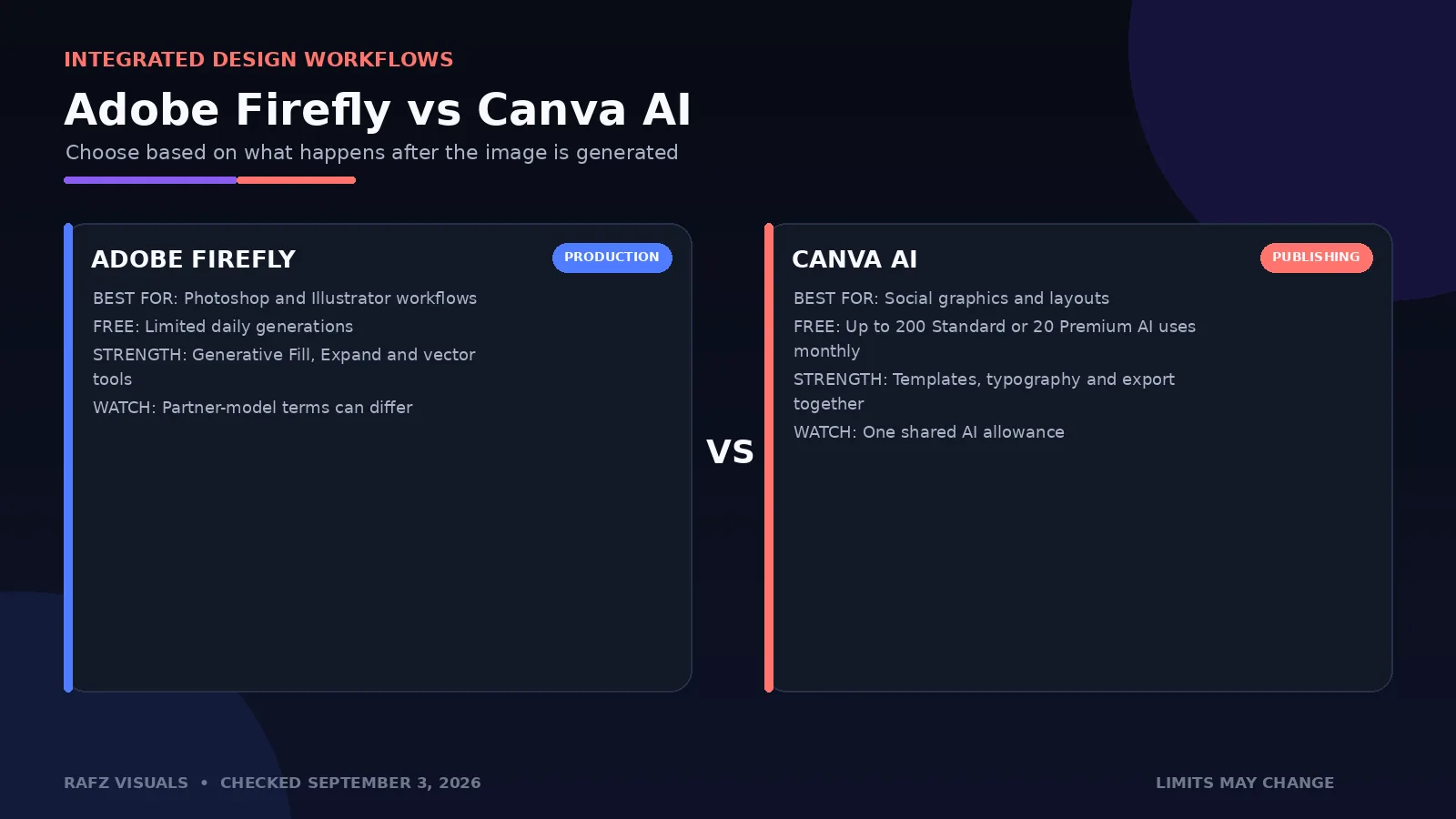
Adobe Firefly is the strongest option for designers who want AI generation connected to familiar Adobe workflows. The free plan currently includes limited daily generations, although Adobe does not promise one universal number for every model and feature. Credit cost can vary depending on the selected model, resolution, and whether the feature is considered standard or premium.
Firefly supports image generation, generative fill, expansion, text effects, vector workflows, and access to selected partner models. Its biggest advantage is what happens after generation: artwork can move naturally into Photoshop, Illustrator, or Adobe Express for real design work.
Why designers may choose Adobe Firefly
Tight integration with Photoshop, Illustrator, and Adobe Express
Text-to-image, generative fill, expand, and editing workflows
Reference-image and style controls
Useful for extending backgrounds and building campaign variations
Content Credentials support for transparency
Important limitation
The free allowance is deliberately described as limited and may vary. Firefly also includes partner models, so designers should check the terms and commercial-use conditions associated with the specific model they select rather than assuming every option has identical licensing.
Best for: Adobe users who want to move quickly from AI concept to editable production file.
4. Canva AI — Best for Social Media and Ready-to-Publish Layouts
Canva AI is not only an image generator. It combines generation with templates, typography, brand assets, resizing, collaboration, and export tools. For social media designers and small marketing teams, that integrated workflow can be more valuable than having the most technically advanced image model.
Canva's current pricing documentation says the Free plan can provide up to 200 uses of Standard AI tools or up to 20 uses of Premium AI tools per month. These numbers share one allowance across multiple AI features, and complex tasks or a mixture of tools can reduce the practical number of uses.
Why designers may choose Canva AI
Generate images directly inside a layout tool
Social-media sizes and large template library
Typography, elements, and export in one workflow
Up to 200 Standard AI or 20 Premium AI uses monthly
Useful for non-designers collaborating with creative teams
Important limitation
The free allowance is shared across Canva's AI tools rather than reserved only for image generation. Commercial use can also involve several layers of licensing: the AI model, Canva library assets, uploaded references, and the final design. Do not assume that generation makes every included element exclusive or trademark-safe.
Best for: social posts, lightweight marketing graphics, presentations, and fast layout production.
5. ChatGPT Images — Best for Conversational Image Creation and Editing
ChatGPT is especially useful when the creative process requires discussion rather than a single prompt. A designer can describe a concept, review the result, request a composition change, upload a reference, correct text, or ask for a new format without rebuilding the prompt from zero.
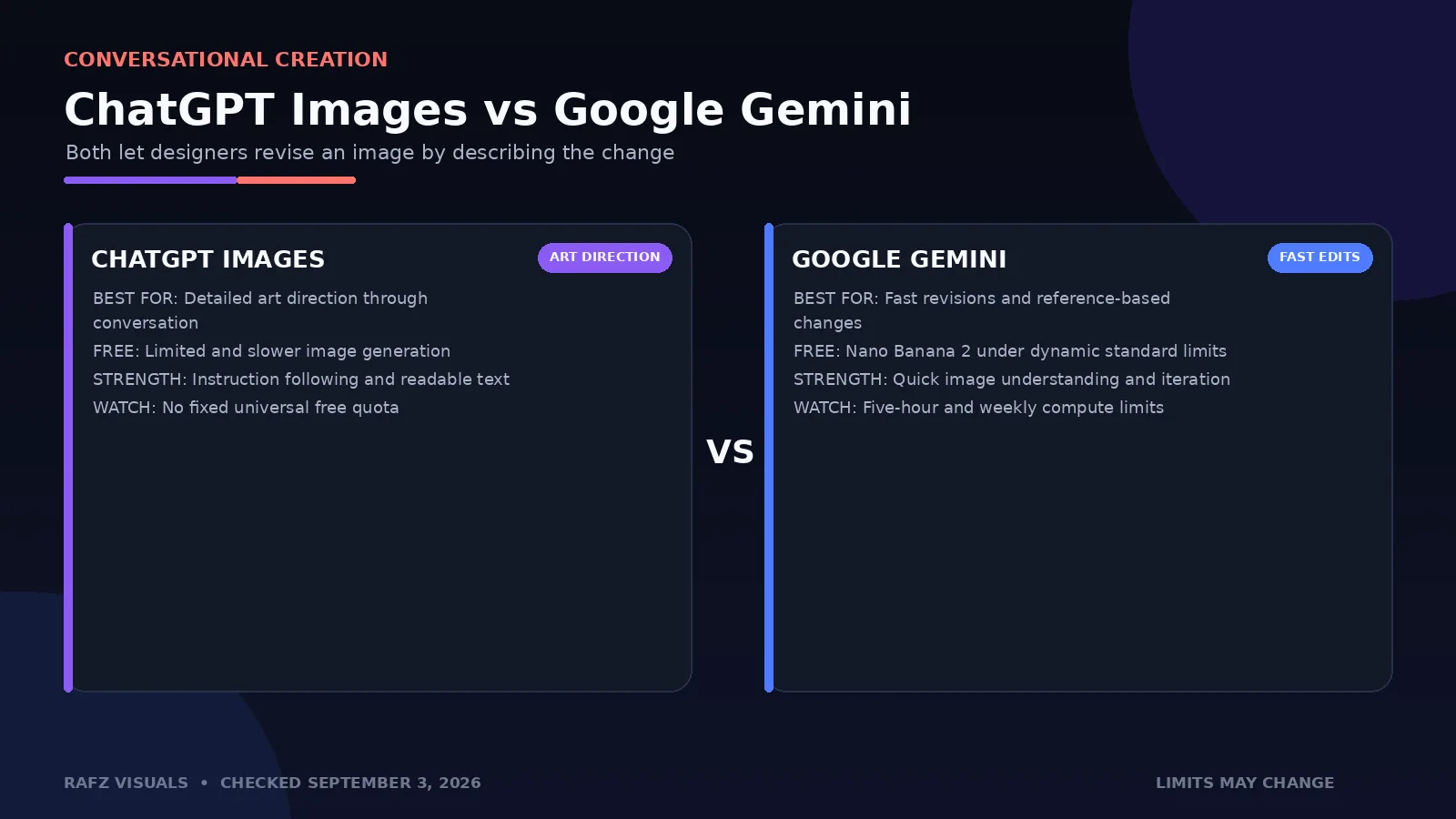
OpenAI's current plan comparison includes limited and slower image generation on the free plan. It does not promise a fixed universal daily image count because access can change with demand and system capacity.
Why designers may choose ChatGPT Images
Natural conversational iteration
Strong instruction-following for detailed scenes
Image editing and reference-image workflows
Helpful for layouts containing readable text
Easy to explore several art-direction options in one conversation
Important limitation
Free access is capped and can be slower than paid access. Designers must still review spelling, anatomy, small details, copied visual elements, and possible similarities to existing work before delivering anything to a client.
Best for: designers who want to art-direct an image through conversation and repeated revisions.
6. Google Gemini — Best for Fast Image Generation and Revisions
Google Gemini currently gives users without a paid Google AI plan access to image generation with Nano Banana 2 under standard usage limits. Google states that limits are compute-based, can vary according to prompt complexity and demand, and refresh every five hours until the account reaches its weekly limit.
Gemini is convenient for generating a first image and then requesting direct changes in the same conversation. It works well for reference-based transformations, composition experiments, visual brainstorming, product concepts, and quick alternatives.
Why designers may choose Gemini
Free Nano Banana 2 image generation
Fast conversational revisions
Strong reference-image understanding
Helpful for product visualisation and scene changes
Available in many countries, including Azerbaijan
Important limitation
There is no dependable fixed number of free images for every user. Google can change limits without notice and may restrict compute-heavy features earlier for free accounts during busy periods. The honest description is therefore “free with dynamic standard limits,” not “unlimited.”
Best for: designers who want quick generation, reference-based edits, and conversational revisions.
7. Ideogram — Best Free AI Generator for Typography Concepts
Ideogram built its reputation around generating images that contain readable text. It is particularly useful for poster concepts, packaging directions, editorial covers, signage, title treatments, and social visuals where typography is part of the generated scene.
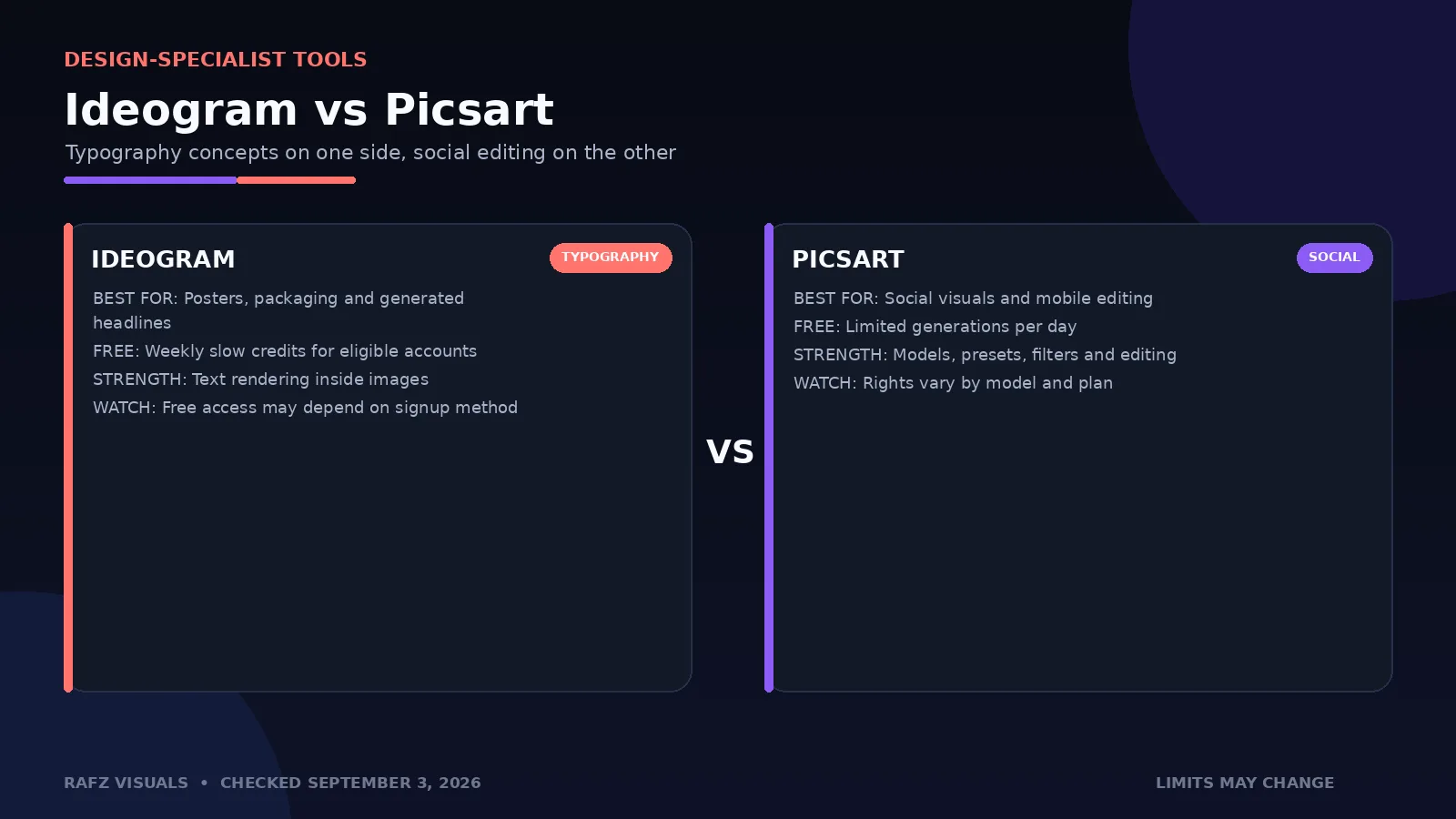
Ideogram currently offers a $0 plan with weekly slow credits for eligible accounts. A practical detail matters here: official account notices state that email-only accounts may not receive free credits, while signing in with Google, Apple, or Microsoft can provide free access. Designers should check the plan shown inside their own account before relying on it.
Why designers may choose Ideogram
Strong typography inside generated images
Useful poster and packaging concepts
Style references and creative exploration
Free slow generations for eligible accounts
Simple web-based workflow
Important limitation
The free plan does not include private generation, and eligibility can depend on the signup method or account. Generated typography is useful as a concept, but final headlines and logos should still be recreated manually with licensed fonts and editable vector type.
Best for: posters, headlines, packaging ideas, and visuals where generated text matters.
8. Krea — Best for Real-Time Visual Exploration
Krea combines image generation, enhancement, editing, video, and real-time creative tools in a single interface. Its official support documentation currently lists 100 compute units per day for the free tier, along with access to basic features.
Krea's real-time approach is helpful during early art direction. Designers can adjust a prompt or rough visual input and see the concept evolve quickly, making it useful for mood boards, lighting exploration, style discovery, and fast presentation sketches.
Why designers may choose Krea
100 free compute units daily
Real-time visual generation and experimentation
Multiple creative models and enhancement tools
Useful for style exploration and rapid ideation
Clean interface for testing different directions
Important limitation
Compute consumption varies by model and action, so 100 units do not equal 100 finished images. The free tier is best treated as an exploration plan. Confirm the latest licensing terms before using free-tier output in paid client work.
Best for: real-time art direction, mood boards, and designers who like to iterate visually.
9. Picsart — Best for Generating and Editing Social Content
Picsart offers a free AI image generator with limited generations per day. The platform combines generation with filters, text, background editing, resizing, templates, and other tools that are useful for quick social content.
Picsart also provides access to multiple image models and style presets. That flexibility is valuable, but it makes the free offer less predictable because availability and usage rights can differ by model.
Why designers may choose Picsart
Free daily image generation
Multiple models, presets, and style filters
Built-in editing after generation
Aspect-ratio controls for social platforms
Convenient mobile and web workflow
Important limitation
Picsart explicitly says that usage rights depend on the selected AI model and the user's plan. Check the licence attached to the specific model before using an output commercially. Free users may also find that premium models or advanced edits require an upgrade.
Best for: social media creators who want generation and familiar photo-editing tools together.
10. Craiyon — Best for Simple, No-Cost Idea Generation
Craiyon remains one of the easiest ways to turn a text prompt into images without beginning with a paid subscription. It is best suited to rough ideas, mood-board material, playful illustration directions, and early concepts rather than polished final campaign artwork.
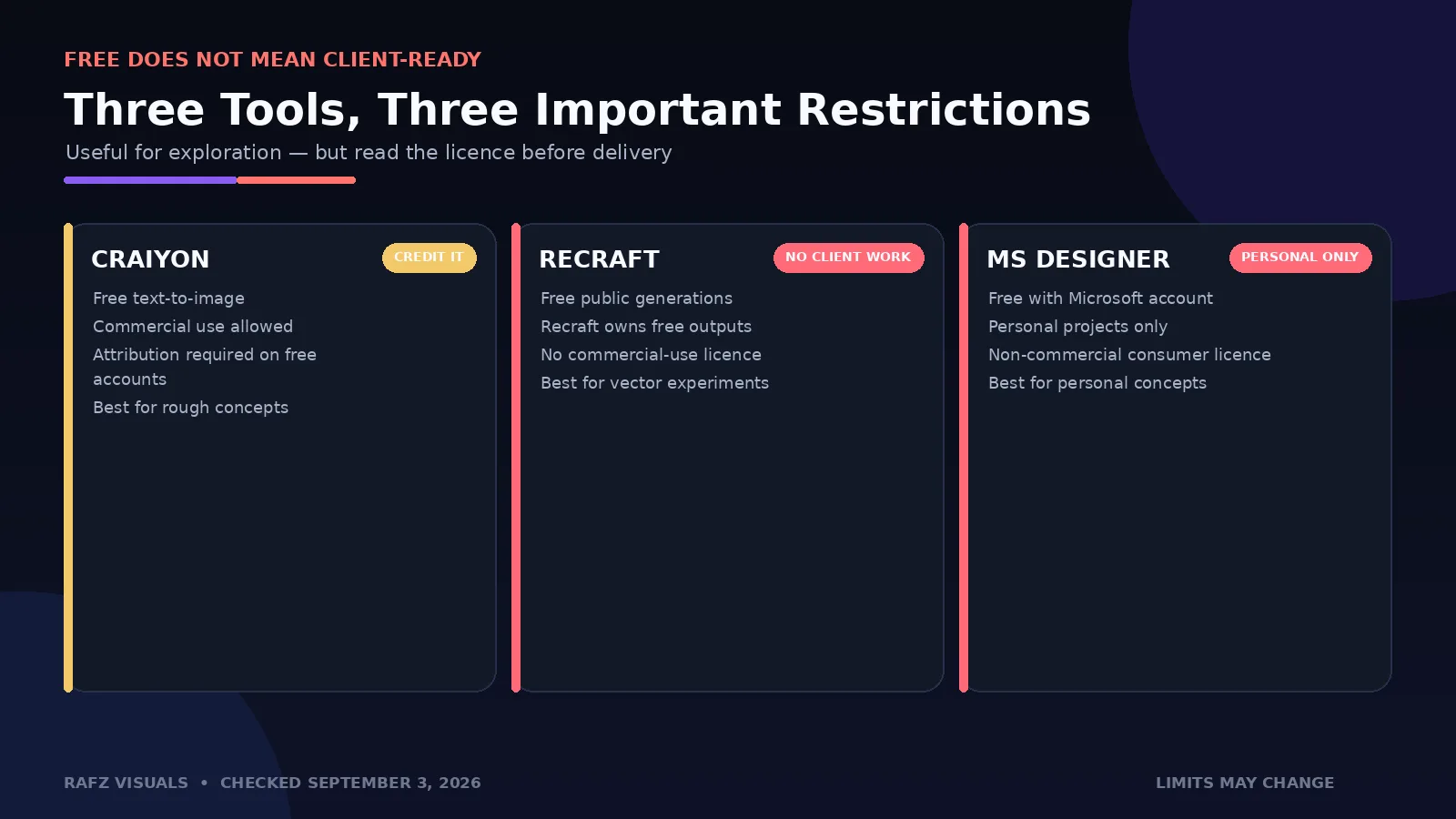
Craiyon allows commercial use for free accounts under its terms, but free users must credit Craiyon. Text-only generation does not consume the edit credits used for features such as retouching or image-input workflows.
Why designers may choose Craiyon
Straightforward free text-to-image generation
Easy for quick visual brainstorming
Multiple casual styles and generator categories
Commercial use permitted with attribution
Useful when high fidelity is not the first priority
Important limitation
Free generations may be slower and lower in quality than premium alternatives. Attribution is required for commercial use, and the output often needs significant refinement before it is suitable for professional design.
Best for: rough concepts, casual experimentation, and early mood-board ideas.
11. Recraft — Best Free Option for Vector Experiments
Recraft is unusually useful for designers because it can generate vectors, illustrations, icons, and style-consistent visual systems rather than focusing only on raster images. It is a strong environment for testing icon directions, sticker sets, editorial graphics, and scalable illustration concepts.
However, the free plan has a major restriction. Recraft states that images generated for free are owned by Recraft, displayed publicly in the community gallery, and not licensed for commercial use.
Why designers may still use Recraft Free
Vector and raster generation
Strong icon and illustration workflows
Style controls and consistent visual directions
Useful for learning and concept exploration
Export-friendly formats on supported workflows
Important limitation
Do not use free-plan generations in paid client work, products, branding, packaging, or stock listings. Upgrade and generate the final asset under a paid plan if you need ownership, privacy, and commercial rights.
Best for: personal experiments and testing vector or illustration directions before upgrading.
12. Microsoft Designer — Best for Personal Design Concepts
Microsoft Designer provides free AI-assisted image creation and editing with a Microsoft account. It can generate images, invitations, greeting cards, banners, stickers, social posts, and other lightweight designs from text descriptions.
The free plan is real, but Microsoft gives an important licensing warning: the consumer version of Designer is licensed for personal, non-commercial use. That restriction makes it unsuitable for normal agency or freelance delivery even though it remains helpful for personal projects and experimentation.
Why designers may try Microsoft Designer
Free with a Microsoft account
Image generation and prompt enhancement
Quick banners, cards, stickers, and social concepts
Background removal, generative erase, and basic editing
Simple interface for personal projects
Important limitation
The non-commercial restriction is decisive. Designers should not use free Microsoft Designer output for client campaigns, paid products, or commercial brand work.
Best for: personal projects, learning, invitations, and non-commercial concept work.
Which Free AI Image Generators Allow Commercial Use?
“Free to generate” and “free to use commercially” are different promises. A platform can let you create an image without payment while still limiting ownership, privacy, attribution, or commercial use.
Clearest free commercial-use options
Playground AI: lists a worldwide royalty-free commercial licence on its free plan.
Leonardo.Ai: grants free users a non-exclusive, royalty-free commercial licence, although creations remain public and Leonardo retains broad rights.
Craiyon: permits commercial use, but free users must credit Craiyon.
Potentially usable, but check the exact workflow
Adobe Firefly: verify the model, feature status, and current terms, especially when using partner models.
Canva AI: review the AI model, Canva asset licence, uploaded references, and final design.
ChatGPT Images: review the output and follow OpenAI's current usage terms; outputs are not guaranteed to be unique.
Google Gemini: check current Google terms and avoid assuming generated content is automatically exclusive or legally risk-free.
Ideogram: check the current plan terms and recreate critical typography manually.
Krea: confirm the licence shown for the free plan before client delivery.
Picsart: rights depend on the selected model and plan.
Not suitable for commercial client work on the free plan
Recraft: free outputs are owned by Recraft and are not licensed commercially.
Microsoft Designer: the consumer service is licensed for personal, non-commercial use.
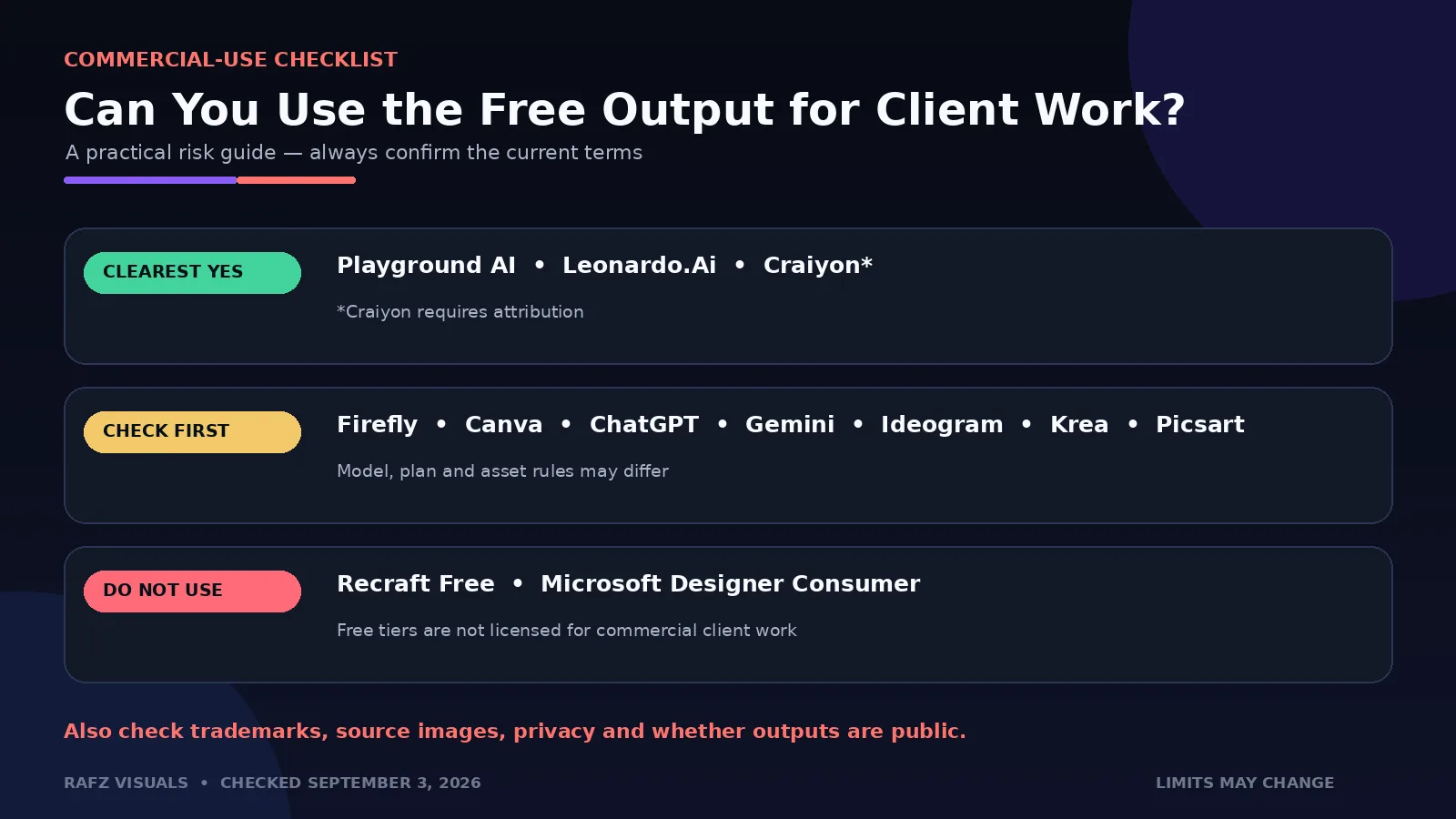
AI licensing is only one part of the risk. Prompts and reference images can still introduce copyrighted characters, trademarks, protected product designs, recognisable people, or unlicensed source material. For professional work, keep records of the selected model, plan, generation date, prompt, source references, and terms that applied at the time.
How to Choose the Right Free AI Image Generator
Choose the tool that matches the job rather than the one producing the most fashionable demo image.
Choose Leonardo.Ai if you need control
Leonardo is the best all-round starting point for designers who want daily credits, multiple models, references, presets, and granular image settings.
Choose Playground AI if you need more free concepts
Its rolling three-hour allowance and stated commercial licence make Playground one of the strongest options for frequent ideation.
Choose Firefly if you already work in Adobe apps
Firefly becomes more valuable when the next step is Generative Fill in Photoshop, vector work in Illustrator, or layout production in Adobe Express.
Choose Canva AI or Picsart for social content
Both combine generation with templates, text, resizing, and export. Canva is stronger for structured layouts and collaboration, while Picsart feels closer to a flexible social photo editor.
Choose ChatGPT or Gemini for conversation-based editing
These tools are useful when you want to describe changes naturally, work from a reference image, and iterate without rebuilding every prompt.
Choose Ideogram when typography is central
Ideogram is the most relevant option for poster headlines, packaging concepts, and generated text, although final typography should still be rebuilt manually.
Choose Recraft for vector exploration only
Recraft is excellent for vector concepts, but its free licence makes it a testing environment rather than a source of client-ready commercial assets.
If you need a broader toolkit beyond image generation, read our guide to the best AI tools for graphic designers in 2026.
Frequently Asked Questions
What is the best completely free AI image generator for designers?
Leonardo.Ai is the strongest all-round free option in this comparison because it provides 150 tokens each day and includes useful model, reference, preset, and editing controls. Playground AI may be better when generation volume and a clearly stated commercial licence matter most.
Which free AI image generator allows commercial use?
Playground AI lists a worldwide royalty-free commercial licence on its free plan. Leonardo.Ai grants a non-exclusive, royalty-free commercial licence, although free images are public. Craiyon also allows commercial use, but free users must provide attribution. Always recheck the latest terms before delivery.
Is Adobe Firefly free to use?
Yes. Adobe currently offers a Firefly free plan with limited daily generations. The exact allowance and credit cost can vary by feature, model, resolution, and demand.
Can I use Recraft's free images for client work?
No. Recraft states that free-plan outputs are owned by Recraft, publicly displayed, and not licensed for commercial use. A paid plan is required for ownership and commercial rights.
Is Midjourney free in 2026?
Midjourney does not offer a dependable ongoing free plan, so it is not included in this list. Occasional promotions or trials should not be confused with permanent free access.
Is Magnific, formerly Freepik, still free for AI images?
Magnific's current official pricing page lists paid individual plans and does not show a permanent free plan. Older articles claiming a fixed number of free daily generations may therefore be outdated.
Are free AI generations private?
Often they are not. Leonardo.Ai and Recraft make free creations public, and several other platforms reserve private generation for paid plans. Never upload confidential client images, unreleased products, or sensitive brand material without checking the platform's privacy rules.
Can an AI-generated image be copyrighted?
Copyright treatment varies by country and depends on human creative contribution. A platform giving you permission to use an output does not guarantee that the image is copyrightable, exclusive, or free from third-party claims. Seek qualified legal advice for high-value commercial work.
Final Verdict
The best free AI image generator depends on what the designer needs to produce. Leonardo.Ai offers the most balanced free toolkit. Playground AI provides an unusually practical rolling allowance and clear commercial-use language. Firefly is the natural choice for Adobe production, Canva excels at ready-to-publish layouts, and ChatGPT and Gemini are strongest when conversational iteration matters.
Free plans are ideal for exploration, mood boards, internal presentations, and early creative direction. For confidential client work, consistent high-volume output, private generations, or stronger licensing, a paid plan may still be the responsible choice.
Treat AI output as raw creative material rather than finished design. The designer's real value remains in art direction, typography, composition, brand understanding, editing, and the judgment required to turn a generated image into effective visual communication.
Comments (0)
No comments yet — be the first.